Showing posts with label software. Show all posts

Thursday, May 22, 2025

TradingView Backtest Script

 Like many people I have tried my hand at dabbling in the stock market over the years, and I have found that I am not very good at it.  For years I dreamed about have a predictive program that just told me what to do, but the only ones in existence were very expensive, far out of reach of the normal person.

Enter Trading View and Grok.

I was able to write a script that could go back in time on any given ticker, and replay a lot of different theory ideas I had to see if they would actually make money over time.


I know this script has it's limitations, and I had a few ideas on how to make it even more flexible.  But for a free tool this is already invaluable for most people to test out their ideas.  You can think of it like paper trading, only instant.  You plug in your "plan" for what signals you want to use for trading, set a date range.  Tell it how much money you want to play with, and what calculations you want to use for how much to buy/sell on each interaction, and it will instantly tell you how well you would do.

The biggest limitation is that the TradingView free account only allows a total of 2 indicators at a time.  And this script is not an indicator itself, it relies on other indicators to help it do the more complex calculations it then makes buy/sell decisions on.

Fortunately there are a lot of free indicators out there you can use to generate values, you can then use my "Multi Indicator Buy/Sell with Backtest" script/tool to see how well the indicator you have chosen does over time.  It's a bit painful changing out indicators one after another trying to find a decent one, so most people should start with the basics like RSI or Fear and Greed.

If you have a complex custom idea for a trend you would like to generate, with Grok it is now pretty simple to create your own indicator that you can use with this tool.  In fact the indicator you see being used in the screenshot for the tool is a custom volatility indicator I had Grok write for me.  It calculates the percent change over a time period that the underlying asset has done; the idea is that you trade during period of high volatility.  So if the value spikes up you sell, if it crashes down you buy; for assets that you are confident will mean revert this is a pretty effective approach.


Monday, August 10, 2020

Milestone Screen Recorder changes Default username

 I've been using the Milestone XProtect VMS system for several years now, and it has had various issues, many of which they have solved over time.

One of their addons, called the Screen Recorder, is a particularly handy piece of software, but has caused an outsized number of headaches given the simplicity of it.

It allows you to record a computer screen pretending as though the computer screen were a camera so all the recording footage is stored along side of all your other video footage in your VMS system.

There are multiple very helpful uses for it, one of the best is in recording customer facing demo systems to make sure people aren't doing things they should not be.

For many years it had a very odd bug in it where if the computer was turned off for too long (days), then the recording server would eventually stop trying to contact it, so when the computer was turned back on, the recording process would not be re-initiated.  However, a recent fix seems to have solved that bug.

A month ago I upgraded my demo system to the 2020R2 version of the recording server, and for the last couple of weeks I have been struggling trying to get a couple of screen recorders to come back online.  Traditionally in the past the big "gotcha" with the screen recorder has been that the username is hard coded to "Milestone" with a capital M.  If you don't know that then you will be trying all sorts of default usernames trying to figure out how to make it work; and of course it is not configurable on the client side, it was also not super obvious in the milestone documentation.  You had to go through their support sites to figure it out in most cases.

Their documentation has gotten significantly better the last couple of years, and I finally decided to re-read the screen recorder install documentation to see what I might have missed since all the old tricks I had learned over the years were not working.  Low and behold, it seems as though they change the hard coded username from "Milestone" with a capital M, to "videoos", as described here.

I had to laugh when I found this change, things worked so smoothly after figuring that out.  But the change is amusing because I can think of no good reason for it.  It is going to irritate all their clients who learned the old way, it will not increase security because it is still a hard coded username like before, and you still can't alter it on the client machine.  I am happy they at least thought to document the unannounced change though as it has not yet made it to any support forum I have found.

Monday, February 24, 2020

Free 000WebHosting Gotcha

I run a small family genealogy website for my immediate relatives.  It is not large, and generates very little traffic, so I have always tried to host it somewhere for free.  Most of it's life it lived on Google's free pages.  However, with Google's recent upgrade to their free web pages system, that system lost so much functionality that I was forced to look somewhere else for hosting.

After comparing multiple offerings I settled on 000webhost.com.  They had site limiters and other restrictions on their free offering, but again, all I need was a basic place for my personal family to be able to read a few stories.  They also allowed WordPress hosting for free, and I am pretty comfortable with WordPress, so it is my CMS of choice.

Everything went very well for multiple months.  We (my family) all worked hard and got the content manually copied from Google's old static page system into the new WordPress system hosted by 000webhost.  After the initial copy several months were spent adding new data, and fixing some of the formatting issues that occurred during migration.

During this time period I was creating backups once every couple of months, which is the only thing that ended up saving us.

One day I got an email from a family member saying that the site was telling her it had been deleted.  I went to login and sure enough, my cPanel login was gone, the entire website was just gone.

I did a little research in the 000webhost KB system, and found an article that said because it was free hosting, if your site ever got deleted, too bad so sad, it was just gone.  I could understand this, it was a free site, that policy made sense; I just didn't know why my site had been deleted.

After contacting 000webhost to see what had happened, I received a very polite email back saying that because I had not logged into the site in a long time, they had deleted it.  I was a bit taken aback, we had been actively working on the site every week for months.  With a bit more clarification I learned that in order for activity on the site to count, it had to be a login specifically to the cPanel system.

At this point I was finally irritated.  It was a free hosting service so any policy they wanted to put in place was fine with me, as long as they were up front about it.  And that was my problem, many other sites had been up front about having a policy like that, but 000webhost had not.  It might be buried somewhere on their site, but at the time I signed up with them there was no warning that this would occur.

This is where the politeness ended from 00webhost, after expressing my displeasure that my site had been deleted with no warning, and no initial knowledge on my part, the response from them said I should have gotten a warning email, but it didn't always work; and they seemed rather excited to see me go.

Needless to say, I took my most recent backup and went to find another host.  There's a decent chance we will start paying for a host eventually as the site grows, but I will never give 000webhost or their parent company hostinger.com my business after an experience like this.

Wednesday, November 13, 2019

Accord.net Machine Learning

Machine learning has been out of reach of the common developer for much of its early life.  While R has come along and stood out as "the" statistics language, it does not easily plug into the more mainstream languages.  Fortunately for us, in the last few years a library called accord-framework.net has grown up to fill this gap.

This framework is written in C# and allows the average .net developer access to a large number of machine intelligence algorithms that require very little statistical knowledge to actually use.  I specify the statistical qualifier because it does take a decent amount of basic c# experience to overcome some of the rough edges in validation the library still has.

The website also includes an impressive amount of documentation with code examples, unfortunately many of these examples are aging and have broken pieces in them due to changes in the software, however they are usually enough to get someone up and going after a little playing around.

Concepts and Implementation

The concept is fairly simple.  All the machine learning algorithms in this library take a two dimensional array of numbers (int or double), along with a single dimensional array of values with the correct outputs.  The algorithm then trains itself on these numbers.

After training you send it another set of numbers in the same format, and this time it will give you back what it thinks the outputs will be.

Your process will look something like this:
- Load datatable with data
- Codify the datatable into integer values using the Codification library
- Extract a two dimensional integer array using a combination of the datatable and the newly created code mapping object for all the columns you want to use as inputs.
- Extract a single dimensional integer array just like you did the two dimensional one, only this time for the single column that holds the values you are trying to guess.  It is important that the order of the values in this single column cause them to correspond with the correct input column values by index location.  If all the columns are being extracted from the same datatable then this should happen naturally.
- You will pass these two arrays into the desired algorithm to train it, some algorithms will require multiple training cycles to tune them.
- Once you have a trained algorithm object you can then pass it another two dimensional array of integers.  This time the values will be used to guess a single dimensional array of output integer values.  One gotcha here is that many of the algorithms can't handle input values they have not been trained on, so you can't throw just anything at it.

Because it works only with integers, any string values you want to use as input or output must first be converted to integers with no gaps between the number values.  You can do this on your own, but for convenience they have provide a special Code library which handles converting standard tables of data into encoded integers and back.

Gotchas

There are multiple bugs and missing features in this Code library, which is one of the biggest challenges that has to be overcome when working with these algorithms.  However, despite these issues I have still chosen to use the conversion library.

I have discovered that it's biggest shortcoming is that it is not capable of handling NULL values in the data.  So first you have to loop through every single value in your datatable and remove all NULL values.  From a speed perspective, this flaw alone probably means it would make for faster code to roll your own; but for the majority of developers out there, it is likely not worth the additional time to do that.

I have read that there is a default value setting inside the library at a per column level that allows the library to deal with NULLs.  For some reason that default either does not work, or is not initialized on its own.

The next annoying issue this Codification library has is really more of a versioning problem.  It looks like over time, rather than fixing particular issues, new methods get created to handle the new cases.  So you end up with multiple methods that run off different logic when encoding values.  Specifically, there seems to be a big difference in Codification between the Transform method and the Apply method.  Transform seems to attempt to specifically encode all columns requested, kind of like the explicit class creation overload that accepts a list of columns.  Apply on the other hand logically processes a datatable detecting which columns need to be converted and which do not.

Thoughts and Concepts

Most of my work in this area has been with the various Classification algorithms in the accord.net library.  These seem to have the limitation of not being able to accept a Continuous (un-encoded int) value type as the output column it is supposed to be guessing.  The solution to this particular issue is probably to switch to using a Regression algorithm.

Something else that might not immediately come to the mind of the average developer is that the output is not going to have any human readable meaning.  Because the system works exclusively with integer arrays, the output will just be an array of numbers.  These output numbers must then be passed through the Codification library a second time, this time in reverse, to get back to the human readable version of them.


Wednesday, May 22, 2019

OWASP ZAP API

When testing a web application there are many different types of tests you can run and automate, and many different ways of doing so.  I currently work in an environment where Microsoft's Team Foundation Server (now called Azure DevOps Server) runs a series of Unit tests and Selenium tests in an automated fashion.  We initially used CodedUI until Microsoft discontinued it, then we converted our code base.

This setup is one giant collection of regression tests like every project should have.  And mingled in with them was some basic security testing from a users perspective as well.  However, what we did not have was a method of automating the ability to test hack attempts against our sites.  One of the reasons why is the shear number of possible hacks and combination hacks that are possible and should be tested for.

Enter the OWASP ZAP tool.  A bunch of security experts have formed a non profit to educate people about security, and one of that companies outputs has been a free (and well maintained) tool for attacking your own sites and producing reports about any security issues it finds.  The best part is that this tool has a pretty well developed REST API, so you can run it in an automated fashion.

The ZAP tool has a decent API UI to help you learn it, but other than that is lacking documentation for it, which is the reason for this post.

If you open the ZAP tool GUI, click on Tools / Options / API you can find your API key and a few API related settings you can mess with.  By default, the tool has a web UI at http://localhost:8080/.  Clicking on the Local API link inside of that will get you into the REST API help and demo area where you can run each call.

In the GUI you can enter the base URL for your site, and click Attack.  That is an easy method of running a one-off attack against your site.  But if you want to automate this process, there are several REST calls involved.

The first thing you need to do is start the application via command line.  On windows it installs to:
C:\Program Files\OWASP\Zed Attack Proxy\zap.bat

Then call these REST endpoints:
- NewSession (clear all unsaved scan histories, just for a fresh start; you could load saved sessions instead if desired)
http://localhost:8080/JSON/core/action/newSession/?zapapiformat=JSON&apikey=[yourapikey]
- SetMode ( sets the scan mode to attack level )
http://localhost:8080/JSON/core/action/setMode/?zapapiformat=JSON&apikey=[yourapikey]&mode=attack
- Spider.Scan ( spider the url to find all the links to attack, this has to be performed before an Ascan attack is performed, the attack itself is only done on URLs already in the ZAP session.  The Spider is the most efficient method of crawling one or more pages and loading all the found URLs into memory.  The attack method only attacks distinct URLs, so it does not matter if the spider duplicates URLs while it is crawling pages. )
http://localhost:8080/JSON/spider/action/scan/?zapapiformat=JSON&apikey=[yourapikey]&url=[an escaped url to crawl]&recurse=true
- AScan.Scan ( fire off an attack for all links the spider found under this base URL )
http://localhost:8080/JSON/ascan/action/scan/?zapapiformat=JSON&apikey=[yourapikey]&url=[an escaped url to lookup]&recurse=true
- JsonReport ( get the total report for all scans and attacks in json format )
http://localhost:8080/OTHER/core/other/jsonreport/?apikey=[yourapikey]

There are many more options, and other REST endpoints you can call to customize from there and to perform other and more detailed automated attacks.  However, those are the base required to create an automated scan and attack.  Hopefully that provides enough of a jump start so others can get the concept down and process further on their own.

Tuesday, January 29, 2019

Installing Milestone Xprotect +

I have been a long time fan of the Milestone XProtect NVR software.  I have multiple installations, and have fought through many install and upgrade issues.

Before the Plus line of their software came out the XProtect product was pretty stable.  It just worked, albeit a bit limited in features.  The new Plus line fixes all the feature issues (lots of fun new features), but the install and upgrade process has become extremely fragile in the process.  Hopefully over time they will start to fix some of these issues.

In the meantime, I thought I would create an install list for anyone else struggling with it.  Almost all of my installs are on smaller windows 10 servers.  Considering that is not even a server OS, it was an afterthought by Milestone when they first started releasing the new product line, and might be the cause of some of these problems.

Install Steps:
- Uninstall IIS (Milestone will automatically install and configure IIS, if you already have it installed then sometimes the install will fail, especially if you have changed any of the default settings).
- Install SQL 2016 Express.  Milestone does not yet support later versions of SQL, and SQL 2015 that it ships with has a random bug in the GEO portion of its code that can cause the Milestone installation to fail.  While technically a SQL bug, Milestone could easily fix this by simply shipping sql 2016 with their product instead of 2015.
( I have been informed by Milestone that as of version 2018, SQL 2016 is the default shipped with it. )
- Do not at any point re-name the computer this is being installed on.  There is a Milestone/SQL bug where Milestone will get the old computer name from SQL and fail during install if you do this.  Again, a SQL bug, but one that Milestone could solve.  If you really want to rename it, then I have heard that there is a SQL script you can run so SQL sees the new computer name.  Research renaming a sql server computer name.
- Next start the Milestone installation, however, do a custom installation and only install the Recording server (assuming you are planning on an all-in-one box).  If you try and install all the software at once then it generally fails.  I believe this is due to a security bug in the Mobile Server install, but am not sure.
- Now do another Custom Milestone install this time installing everything.  Again, the custom install will prevent the Mobile server from being automatically installed.
- Open up the Management Client and create a new local admin account.  XProtect has some security bugs I have not yet figured out related to using the build in windows accounts which is the default.
- Use this local admin account when connecting to the Smart Client if the build-in account does not work.  Not a bad habit anyway in case you log into the computer with a different account in the future.
- Find and install the Milestone Mobile Server package.  When it asks for credentials to connect to the recording server, use the new local admin account you created instead of the default of the windows credentials.

At this point you should be up and running with a new install of Milestone XProtect+.  I have run into issues during upgrades where the database got corrupted in some fashion so everything looked good, but then I started having quirky issues when messing around with trying to bring cameras back online.

Wednesday, October 19, 2016

Downloading Ancestry.com Media

Ancestry.com has never created a good system to back up the data that is on their site. The only option people have is to download the GEDCOM file, which is often a mere fraction of the data they have invested in the site.

For years now my family has been investing time in building a well documented family tree on ancestry.com, and I have made sure to frequently backup the GEDCOM file so we didn't lose the data.  With thousands of media files on the site I have become increasingly concerned about the loss of a major portion of our research if I was unable to download them.

To combat this problem I finally wrote a small Chrome extension that allows you to screen scrape your media files in an automated fashion.  It is not perfect, but considering it is the only way to get your data, it is nice to have.

The extension downloads the files in mass and dumps them all into your default downloads folder.  So, you should clear all files out of your default downloads folder before using this extension so you know that all downloaded files belong to Ancestry.

After installing this extension, you need to:
- log into your ancestry.com account
- open up your tree
- open up the Media page, which is one of the items on the menu inside the tree
- click on either the Photos or Stories tab, currently the All, Audio, and Video tabs are not supported
- OPTIONAL: click on the page you want to resume downloading at.  This is useful if you need to stop downloading for a period of time, say if you only want to run the downloads during the night.  You will likely end up with a few duplicate files if you attempt this.
- click on the Extension icon in your Chrome browser upper right corner, and click the Download Media button

If your browser is asking you to save every file then the extension will not be able to correctly calculated the required download time and it will go on to the next page before you are done. It is expecting the download to automatically start.  To fix this problem, go into your browser settings and adjust it so downloads do NOT always prompt you for a save location. Instead set a default location for it to use every time. The only way I could fix this issue would be to create a setting that allows the user to manually click the next page button instead of having it automated. And I think that would kind of defeat the point of the extension.

If the downloads are occurring too quickly and swamping your computer then let me know.  I am planning on allowing the download speed to be adjusted in the future.  Currently a file is downloaded every 2 seconds, which works well for me, but for people who upload lots of large files it will not work as well for.

NOTE: There is a small chance that using this is against Ancestry's terms of use.  Their terms of use forbid scraping tools, however the language seems directed at automated scripts that run in the background.  This tool is simply a browsing aid performing clicks for you, but your browser is still open and doing all the browsing and preventing you from doing other browsing simultaneously.

EDIT 10/2018:

Just released a new version that works with Ancestry's latest photo hosting method.  In order to get it working again the extension is going to need permissions to open and close windows as well as download files.  When you first try and use the photo downloading feature Chrome will likely popup a few requests asking you to let the extension do downloads and open and close windows.  So expect that as you try to get it going.

This version also handles the Start/Stop downloading sensing better.  Although, I have noticed that sometimes it takes one or two tries to get it to stop downloading depending on at what point in its execution you click the stop button.

Wednesday, April 16, 2014

Spiceworks Migration: an existing connection was forcibly closed by the remote host

I recently had to migrate my Spiceworks install from a Windows XP machine to a Windows 2012 server.  There was nothing wrong with the Windows XP machine, other than XP being end of life.  We simply needed faster hardware as we were planning on using the new help desk system built into it; prior we were just using it as a network scanning and monitoring solution.

I had tested the Active Directory integration on the Windows XP machine and had it all working nicely.  Unfortunately when I brought it online on the Windows 2012 server, Active Directory users were no longer able to login.

After looking through a lot of posts I checked out the AD scanning settings and noticed that I was getting the error: "an existing connection was forcibly closed by the remote host" regardless of the user account I tried to log in as.  In fact, after some more playing, I noticed that none of the credentials I was trying were even saving to the system, perhaps it only saves if there is no error.  However, I did get a different error if I changed the name of the domain controller, and in the domain controllers security log I was able to see successful authentication attempts.

I was quite confused, I tried all sorts of suggestions and even verified that LDAP was working correctly using the ldp tool as one post suggested.  I tried looking through the logs but could find no no mention of keywords "LdapAD" or any of the other keywords that other people had mentioned finding.

Finally I ran across a post where the user solved their problem by changing the LDAP port to 3269.  That got me thinking, I had the same issue when I was first trying to set mine up and I had set mine to 3269 at that time as well to resolve the issue.  I tried removing that setting, and suddenly everything worked.  The only thing I can think of is that the port it likes is different between the WinXP machine I came from and the Win2012 machine I am now running on.  Since the AD machine never change it does not makes sense to me, but it works.

Thursday, February 6, 2014

Installing Sharepoint 2010

The Problem
It took me far longer than I care to admit to figure out how to successfully install Sharepoint 2010. I spent hours searching Google, giving up, trying stuff on my own, and going back to Google.  My major symptom was a "successful" install but the web administrative interface was simply a white screen, no errors, absolutely nothing.

I tried everything I could think of, including creating my own tested and working website and copying over the sharepoint files into it.  But the best I could ever do was generate a 500 error (better than a blank screen at least) as soon as the sharepoint web.config file was in the website folder.  This entire time I had focused almost exclusively on the website as being the source of the issue, it wasn't until I tried to uninstall (again) that I started thinking down another path.  This time the uninstall failed with the error:

Microsoft SharePoint 2010 uninstall did not complete successfully.
One or more required OFFICE components failed to complete successfully.  For more information consult the setup file.
This started me thinking about it's dependency on office.  I had always known Sharepoint was heavily integrated with office, but I had always assumed it was an optional feature, akin to a plugin.

Finally I happened on Marek Suscak's blog and was able to commensurate that I had gone through many of the same failed steps.  Although in my case most of the steps simply didn't apply as the values were already set to whatever the recommended fix was.  I had already installed a Complete, rather than stand-alone, instance, and I had giving it a domain account to run under.

The Solution
As a result of Marek's blog post I ended up with a copy of office installed on the server.  Sharepoint claims it does not require office to run, however the install must have fixed some of the other prerequisites that either installed corrupted or that I had tampered with because the sharepoint configuration wizard was able to get past the first couple of screens now.  However, it was still hanging on the IIS screen saying it was not installed; even though I had multiple sites running on the server.

A refreshingly fast search later I came upon a technet forum in which someone was having the same issue, and down at the very bottom, the very last suggestion was to install the legacy IIS 6 Management Compatibility features, I tried it and like magic my sharepoint admin site was suddenly working.

My Complaints
There are all sorts of things I could complain about in this install, although the worst part of it all was simply the total lack of error messages.  Even the log files didn't show anything that stood out.  Considering Microsoft's big push with .NET to give detailed error messages it felt like I had been thrown back to windows 95 days.

However, I think all of it could have been avoided if the prerequisites installer were simply better.  Either it failed, or I failed to install all the prerequisites; however it gave me a clean bill of health when I was done.  Obviously it missed a couple of very critical components.

Thursday, August 1, 2013

Organizing the Kindle Library with Kindle Collection Manager

While I was deployed to Afghanistan I did a lot of reading.  With limited technological resources that was the best method of passing the time.

My girlfriend had been wonderful enough to purchase me an Amazon Kindle prior to me leaving country.  I had taken the time to download every public domain free PDF book I could find, which was quite a few.  However, while the Kindle is the best e-reader I have seen, it's organization and search features are some of the worst I have seen.

To help overcome this issue, I found a small program called Kindle Collection Manager; which helps organize the books on the Kindle.  It is not a fancy or many featured program like Calibre, it is designed to be a super light weight method of modifying the library file directly on the kindle itself.

While the kindle can hold close to 3000 books, its OS is incapable of running at a decent speed with so much of its memory consumed.  While the Kindle may be incapable of being filled to capacity with books, this program does allow be to group about 1000 books into manageable collections.  I believe that should be enough books for me to carry around at any one time.  The rest of my digital library can remain organized on my computer and I can swap out collections as desired.

Wednesday, April 17, 2013

Active Reports "OpenedReport is undefined" or "ViewerViewModel is undefined"

Active Reports is one of the top reporting systems available for .NET, unfortunately it has a couple of major shortcomings.

The first problem is the nearly complete lack of documentation.  It kind of reminds me of the early days of Microsoft Windows and trying to find documentation on any given API call.  Also, while friendly, their support staff seems lacking in basic technical knowledge if anything out of the ordinary goes wrong.

The second problem is the systems focus on windows development.  This focus is so heavy that their web offering has been all but neglected.  They do have a couple of nice viewers for the web, but some of the basic functionality, like exporting, is missing from them; the HTML viewer doesn't even have the ability to print.  All this functionality is supported by the system, but has to be written and added by the developer using the product; a huge shortcoming in my opinion.  This lack of integrated details is consistent throughout the entirety of their web offering.

With the shortcomings out of the way, on to the problem this post is about.  The pesky "OpenedReport" error.  There are lots of posts all over the web about this error, but few people seem to really understand it, and Active Reports staff just point developers to the HttpHandlers setup page to solve the problem.

This error occurs when the page is unable to find or load the primary javascript libraries used by Active Reports.  The "ViewerViewModel" error has the same root cause, it just shows up when using the flash viewer rather than the PdfReader viewer.  Active Reports hosts all of their javascript in a dll called "GrapeCity.ActiveReports.Web.v7" (or whatever version you are using).  The files are then accessed using the following calls to the web server:


 src="Command=ArResource;ScriptId=lib.jquery-1.7.2.min.js.ar7"
 src="Command=ArResource;ScriptId=lib.json2.js.ar7"
 src="Command=ArResource;ScriptId=resources-7.1.7470.0-en-US.js.ar7"
 src="Command=ArResource;ScriptId=RSU-7.1.7470.0.js.ar7"

Those calls can all be seen in the source code for the page.  If you notice all the file extensions end in .ar7 which is not a standard web extension.  This is where the HttpHandlers come in, they are supposed to recognize this extension and redirect it to the correct dll to serve up the desired content.  However, the request must first make it to the asp.net engine in order for the web.config file to be able to handle the request.  This means that IIS must either pass all extensions through to the asp.net engine, or have the .ar7 extension added to it's list.

I am running IIS6, so I went in to the properties for my website, the Home Directory tab and the Configuration button and added a new extension of .ar7 pointing to aspnet_isapi.dll.  If you don't know the path of your dll look at any of the other extensions, almost all of them will point to this dll.  If you wished you could also point them directly to the activereports.web.v7 dll, but I prefer .net to handle all my requests and so pointed it to the generic handler to keep things consistent.

When adding this new extension mapping there are two check boxes which are VERY important.  "Script engine" should be checked, this tells IIS that this is an executable file and to go ahead and run it.  The "Verify that file exists" must be UN-checked; since all the files that active reports will be requesting are virtual files IIS will never be able to find them and would reject all requests for them if this box is checked.

Adding that extension along with the web.config handlers should solve your problem, this is my detailed analysis on this error.

Monday, April 15, 2013

Blank page in Active Reports using flash viewer

I started using Active Reports for the first time and wanted to try out the various viewers.  After spending hours trying to figure out why the flash viewer was not showing anything but a blank page I started to be convinced that there was a problem with the plugin in my browser.

So, I downloaded a free swf video off the net and hard coded some HTML to display it on my page.  When that worked I returned to troubleshooting Active Reports itself.  Viewing the source for my page I found my hard coded flash code and compared with with the auto generated flash code from Active Reports.

Every help site I had been to said to put the Active Report swf files ( there are two of them ) into the root of your application, which is where mine were.  Looking at the HTML output however, I noticed that it was actually looking for them in the same folder that the page was being executed it; which was not the root of my site.  Moving the two swf files and related Theme folder into the correct sub-directory everything started to work.

Edit: I recently ran into a similar version of this problem.  I published a website after first deleting all the files in the destination directory.  When I ran the report using the HTML viewer I got the error "Failed to send request to ./ActiveReports.ReportService.asmx/RunReport - Internal Server Error".  One guy said a handler issue caused this problem for him.  In my case it was the actual .asmx file that was missing since it never actually got published.  As soon as I copied it into the destination directory things started working again.

Saturday, July 28, 2012

Convert e-books without loosing file names

I managed to get my hands on a few star wars books, unfortunately they were all in .epub format which couldn't be read on my Kindle.

I tried using the calibre software to convert them, which worked, but it threw away all the file names so I lost a lot of the meta data stored there.  To get around this I created a script which loops through the files in a folder and coverts them into another folder keeping the same file name.

A copy of the script can be found here

Saturday, January 8, 2011

Microsoft's SkyDrive and Online Office Suite

I just found something very interesting.

I have been using Google for just about everything I can think of in my life, so unfortunately for now Microsoft has missed the boat of having me as their customer online. I still have an account with them but don't use it all that frequently. The main reason for this is that Microsoft has always offered an inferior product online to almost any other company out there.

At first their only offering was Hotmail, not bad and it certainly revolutionized the world of free online email, but it didn't keep up for long; it was a great innovation and they captured the online world with it. But then they slept on it, the few improvements made didn't keep up with other companies online offerings. Then came the "Live" branding and a new level of effort was put into their online free products. They greatly improved, once again surpassing much of the competition, however they are still playing catchup to Google in this area. During this period Google has captured a good chunk of their user base, especially the tech minded people.

The online world started expanding from just email offerings to online storage and office suites. Google was the first of the two giants to hop on board with free online office documents and forms of online storage. Then Microsoft came out with a massive free online storage offering trying to dwarf it's competition. I even use this for the shear volume they offered; at one time it was 20GB.

Most recently they have finally caught up to Google's online office suite offering. There have been quite a few smaller companies offering online office sweets for free, but the convenience wasn't there for me. Extra logins, slow load times, etc, all kept me away and happy with Google's ever improving version of office applications. Now it appears Microsoft has finally rolled out a free version of their office suite completely usable online.

With this Microsoft is once again within sight behind Google and I have hope that Google will be given a run for their money. However, I will continue to stay with Google for now for two reasons. One, I am already entrenched there and moving would be hard. Two, Microsoft still has very busy graphics intensive pages that just don't feel like a pleasant environment to me. Also their organization is still lacking. Google has a simple and consistent organization that makes it easy to find all my stuff. While Microsoft has gotten better, their online environment still feels confusing, unintuitive, and heavy.

But, for those who want an alternative to Google's online documents. Microsoft is now a good alternative. I'm very happy to see this progress on their part, I was almost ready to write off Microsoft as having given up in the online race.

Saturday, January 1, 2011

Latitude Tracker - Google Chrome Browser Extension


-------------
Edit: I originally intended on hosting this Chrome Extension on the chrome extensions website. But then I discovered that google had locked out all developers unless they paid a $5 fee for the privilege of giving away free programs to people. I expect google will probably find a better solution for the problem they were trying to fix, but in the meantime I'd still like to make this extension available to people, so I zipped it and uploaded it to google docs. Click on the title to download it.

Unfortunately you will have to manually install it by:
1. unzip/unpack it to a folder
2. open chrome ( web browser )
3. click the Wrench button/tools/extensions
4. click Developer Mode
5. click Load Unpacked Extension
6. select the directory you just created when you unzipped the file and press ok.
-------------

This is v0.3, a kind of google beta, if you will.

It is designed for laptop users to keep their Google Latitude positions automatically updated.

Features:
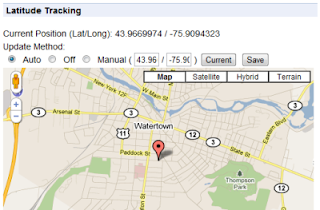
1. Shows your current location on a map.
2. Updates your latitude account with your location periodically.
3. option to set how long ( in minutes ) between updates. default 5
4. option to set how long ( in minutes ) it checks back if an error occurs. default 1
5. option to turn it off, or update with a custom position in coordinates. default auto

Currently it updates your Latitude account every 5 minutes, as well as shows you a nice little popup with your position in coordinates and on a google map.

Screenshot:

Credits:

I have to thank the "Google Latitude Updater" project from google code which doesn't seem to have made it to production, but had some crucial code to help me over a rough spot.

Also the "Geo Location" chrome extension which can be found on the chrome extensions site. The popup and geo locating code showing your position on the map actually came from there; I intend to add to it in future versions, but for now not much has been changed.

Wednesday, November 4, 2009

Free faxing with Skype

I discovered a wonderful little add-on to skype that allows you to fax with your computer. For infrequent faxers it is free, and there are paid options for those who fax a lot.

Thursday, July 24, 2008

FireFox Extension For New Gmail

Gmail is an absolutely awesome product and I personally believe it revolutionized the world of free web based email clients.

However every now and then there is some little feature or functionality you just which you had. The GMail team is doing a great job of adding features but they can't do everything right away. Fortunately a bunch of FireFox extension hackers got together and made tweaks for things they found annoying; they then bundled them together and offered the package to the world.

Hopefully all the ideas in this extension will eventually made it into the native GMail interface, but until then it is one extention that makes the GMail experience much cooler. Check it out here:
GMail FireFox Extension

Thursday, June 12, 2008

Run older extentions on new versions of firefox

[quote url=Here]
The key to the fix is to prevent Firefox from checking its version number before it tries to load extensions. To do this, you will need to set a new preference value. Point your browser at the URL "about:config", then right-click on the preferences list to bring up the contextual menu. You should see an option that says "New." Select that, and choose "Boolean." When it asks you for the preference name, type "extensions.checkCompatibility" (without the quotes). You have to enter the name exactly. For the value, choose "false."
[/quote]

Don't forget to restart the browser after applying the fix.

Tuesday, May 13, 2008

Terminal Server Admin Pack

There are lots of places to download this on the net, but it can be kind of a pain not having the link right at ones finger tips when needed.

This is a link to download the Microsoft Terminal Services Administration Pack.

Thursday, September 27, 2007

New method of hanging onto notes

I recently discovered Google's Bookmark feature which allows me to put a really cool javascript button on my toolbar. It isn't a complete replacement for the blog as it lacks easy access and search features, but as a basic and transportable bookmarking system it works really nice.

It's these extra little features that keep popping up that keep me with google.