Saturday, January 8, 2011

Microsoft's SkyDrive and Online Office Suite

I just found something very interesting.

I have been using Google for just about everything I can think of in my life, so unfortunately for now Microsoft has missed the boat of having me as their customer online. I still have an account with them but don't use it all that frequently. The main reason for this is that Microsoft has always offered an inferior product online to almost any other company out there.

At first their only offering was Hotmail, not bad and it certainly revolutionized the world of free online email, but it didn't keep up for long; it was a great innovation and they captured the online world with it. But then they slept on it, the few improvements made didn't keep up with other companies online offerings. Then came the "Live" branding and a new level of effort was put into their online free products. They greatly improved, once again surpassing much of the competition, however they are still playing catchup to Google in this area. During this period Google has captured a good chunk of their user base, especially the tech minded people.

The online world started expanding from just email offerings to online storage and office suites. Google was the first of the two giants to hop on board with free online office documents and forms of online storage. Then Microsoft came out with a massive free online storage offering trying to dwarf it's competition. I even use this for the shear volume they offered; at one time it was 20GB.

Most recently they have finally caught up to Google's online office suite offering. There have been quite a few smaller companies offering online office sweets for free, but the convenience wasn't there for me. Extra logins, slow load times, etc, all kept me away and happy with Google's ever improving version of office applications. Now it appears Microsoft has finally rolled out a free version of their office suite completely usable online.

With this Microsoft is once again within sight behind Google and I have hope that Google will be given a run for their money. However, I will continue to stay with Google for now for two reasons. One, I am already entrenched there and moving would be hard. Two, Microsoft still has very busy graphics intensive pages that just don't feel like a pleasant environment to me. Also their organization is still lacking. Google has a simple and consistent organization that makes it easy to find all my stuff. While Microsoft has gotten better, their online environment still feels confusing, unintuitive, and heavy.

But, for those who want an alternative to Google's online documents. Microsoft is now a good alternative. I'm very happy to see this progress on their part, I was almost ready to write off Microsoft as having given up in the online race.

Saturday, January 1, 2011

Latitude Tracker - Google Chrome Browser Extension


-------------
Edit: I originally intended on hosting this Chrome Extension on the chrome extensions website. But then I discovered that google had locked out all developers unless they paid a $5 fee for the privilege of giving away free programs to people. I expect google will probably find a better solution for the problem they were trying to fix, but in the meantime I'd still like to make this extension available to people, so I zipped it and uploaded it to google docs. Click on the title to download it.

Unfortunately you will have to manually install it by:
1. unzip/unpack it to a folder
2. open chrome ( web browser )
3. click the Wrench button/tools/extensions
4. click Developer Mode
5. click Load Unpacked Extension
6. select the directory you just created when you unzipped the file and press ok.
-------------

This is v0.3, a kind of google beta, if you will.

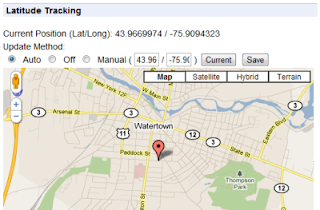
It is designed for laptop users to keep their Google Latitude positions automatically updated.

Features:
1. Shows your current location on a map.
2. Updates your latitude account with your location periodically.
3. option to set how long ( in minutes ) between updates. default 5
4. option to set how long ( in minutes ) it checks back if an error occurs. default 1
5. option to turn it off, or update with a custom position in coordinates. default auto

Currently it updates your Latitude account every 5 minutes, as well as shows you a nice little popup with your position in coordinates and on a google map.

Screenshot:

Credits:

I have to thank the "Google Latitude Updater" project from google code which doesn't seem to have made it to production, but had some crucial code to help me over a rough spot.

Also the "Geo Location" chrome extension which can be found on the chrome extensions site. The popup and geo locating code showing your position on the map actually came from there; I intend to add to it in future versions, but for now not much has been changed.

Sunday, September 12, 2010

WCF Service this.Invoke The operation has timed out

Well I had another issue which stumped me for awhile. It's a simple fix, but I spent a while on it so I figured I would try and save others similar pain.

So here is the scenario. I just added a new Web Service for my project to consume using the URL which pointed to the source WCF Service. I have consumed a lot of web services in the past so it was nothing new and I built out all the code rather quickly for it. However, when I tried to run it, it would always timeout, no other errors just a timeout:


Server Error in '/' Application.

The operation has timed out

Description: An unhandled exception occurred during the execution of the current web request. Please review the stack trace for more information about the error and where it originated in the code.

Exception Details: System.Net.WebException: The operation has timed out

Source Error:


Line 82:         [return: System.Xml.Serialization.XmlElementAttribute(IsNullable=true)] 
Line 83:         public string SaveMethod(string AppId, [System.Xml.Serialization
.XmlElementAttribute(IsNullable=true)] CustomObject myobject) {
Line 84:             object[] results = this.Invoke("SaveMethod", new object[] { 
Line 85:                         AppId, 
Line 86:                         myobject});

Source File: C:\path\Reference.cs Line: 84

Stack Trace:


[WebException: The operation has timed out]    
System.Web.Services.Protocols.WebClientProtocol.GetWebResponse(WebRequest request) +358    
System.Web.Services.Protocols.HttpWebClientProtocol.GetWebResponse(WebRequest request) +42    
System.Web.Services.Protocols.SoapHttpClientProtocol.Invoke(String methodName, 
Object[] parameters) +268    System.Web.Util.CalliHelper.EventArgFunctionCaller(IntPtr fp, 
Object o, Object t, EventArgs e) +37    System.Web.Util.CalliEventHandlerDelegateProxy
.Callback(Object sender, EventArgs e) +91    System.Web.UI.Control.OnLoad(EventArgs e) +148    
System.Web.UI.Control.LoadRecursive() +122    System.Web.UI.Page.ProcessRequestMain(Boolean 
includeStagesBeforeAsyncPoint, Boolean includeStagesAfterAsyncPoint) +3412 


Version Information: Microsoft .NET Framework Version:2.0.50727.3615; ASP.NET Version:2.0.50727.3614


I removed some of the stack trace that was specific to my application...

After fighting with this issue for a day or two, stepping through the code, monitoring calls at both ends, the basic troubleshooting stuff. I finally read this blog post again, who knows what neurons in my brain got triggered and why, but it clicked... I had added my WCF Service as a Web Service. Adding WCF Services isn't quite as intuitive as the old web service was because there is no Add WCF Service option in the visual studio 2008 gui that I could find. Instead you have to right click on the project name itself and click Add Service Reference.

---------------------

The next error I fought trying to get this web service up was:
System.Net.WebException: The remote server returned an error: (405) Method Not Allowed.
This was resolved by making sure that the "endpoint address" on the server had the service URL without the final file name. While the client "endpoint address" had the fully qualified url of the wcf service.

Sunday, August 15, 2010

Google Chrome Incognito Doesn't load GMail

I just had an interesting issue.
for some reason gmail stopped working in google chrome. It still worked great in the regular browser, but as soon as I went incognito I would get a blank screen.

I found the answer at the linked google forum site. It was very basic and something I would expect and try instantly in Internet Explorer, but I have never had the issue in Chrome. Turns out all I needed to do was clear the browsing history and cache. A simple fix and I am glad that was all it turned out to be, at the same time that's a trick that IE pulls; Chrome is supposed to be better than that. However, that is the first time ever that I have had that issue, hopefully it doesn't become a habit of it.

Edit: apparently that only fixed the issue for a short period. A few minutes later it started having the issue again and I have been unable to get it fixed.

Edit2: well what do you know, a few days later it just started working again. Apparently google worked out the issue and sent out an update. It's good to know they are still working on it. I love this browser.

Saturday, August 7, 2010

Chrome Extensions

Well finally, after all this waiting, Google Chrome finally has official extensions.
Some of us have played around with the unofficial things which have been ok, but not so easy to use; however now we get the official integration and it sure is slick.

They seem to have a pretty good range of diversity as well. The two that I have settled on using right now are the google voice and gmail as default mail client extensions. There seem to be a few great ones for web developers as well to bring up to speed with the development helpfulness of firefox.

So far my limited experience with them has been really good. While the helpfulness of any given extension depends on its developer, the interface to use them seems almost perfect. They have a very fast download time, almost instantaneous install and uninstall, and so far have been unimposing and have not seems to affect my browser speed.

Sunday, June 27, 2010

Purchasing plane ticket

I've been trying to figure out when the best time to purchase a plane ticket on orbitz.com is.
It's been quite a confusing process, purchasing a plane ticket has got to be one of the least straight forward things I have ever tried to acquire.
Each day brings slightly different pricing, and occasionally when I click on a price I want to explore it has disappeared.
Another very annoying thing is price disclosure. Orbitz seems to at least try, but some flights require the archaic method of mailing me the tickets on paper. This ends up adding about $30 to the total package. Not only does this make me mad when I have already settled on a price, but how does it benefit the airline? They now have to go through the work of mailing out a set of tickets, which is extra overhead, when they already have a better system in place; and they have to deal with tickets getting lost in the mail.
Also it is hard to shop around and compare prices on other ticket sites with the pricing changing so quickly, I might come back to my good deal only to find it gone.

Monday, June 7, 2010

getting ready for permanent duty.


Well in a couple of months I will be heading to my permanent duty station. Looking like Ft Drum though possibly Ft Lewis. I would much prefer Ft Lewis, Ft Drums snow doesn't sound super appealing, plus Ft Lewis is much closer to home.

AIT barracks are horrible, so I was looking at trying to figure out what my new home would look like. Here is a picture someone took of their room at Ft Drum: