
I recently ran into a rather interesting issue regarding enabling POE for a switch-port module. Those of you who have worked with routers extensively for years are probably well aware of both the problem and the solution, however those of us who have only a years experience managing them need some nudges in the right direction some times.
Problem:
Now for the problem. We had done some recent updates on our networks routers adding sticky mac configurations to the switch-port modules inside them. After the update a few of our users started reporting that their IP phones would no longer power up. Their computers hanging off the same switch-port modules were all working fine. But not all switch-port modules were having the issue.
Solution:
After spending hours going through the configs we sought external help. I was lucky enough that the first person I talked to had not only heard of the issue but had been able to find a solution. The solution was so simple it is almost embarrassing to post it. I learned that POE for routers modules is tied to the default VLAN for that router, in order to allow power to flow through to the switch-port module we needed to trunk the default vlan through on the switch-port modules trunk port, in our case vlan 1.
As soon as we trunked vlan1 through everything powered up and life was good again. For security reasons we had been trained to shut the default vlan down and never use it. It never occurred to me to check to see if a vlan, which was always administratively down, had access. It is still rather odd that power flows even though the interface is down, yet still requires the interface on the trunk port.
A collection of problems and discoveries usually related to the tech industry in some way.
Friday, December 9, 2011


Saturday, December 3, 2011
Logitech USB Headset Low Volume
My mother was having problems with her Logitech USB headset, we would be chatting and she was having trouble hearing me. It took a little while but she finally came across a rather unique solution on the Internet.
A few days later she lost the ability to use her headset at all, I couldn't even hear her. After some basic troubleshooting I suggested that she try restoring her computer to date prior in which it worked. This worked and I was once again able to hear her, however she was no longer able to hear me very well. I looked through my email and found the solution she used once before and using that she made adjustments to her volume until things worked normally again.
She then had a feedback problem which she used a prior blog post of mine which talked about muting the microphone to fix.
I don't know where on the Internet she got the following quote, if anyone knows let me know so I can give credit to the original poster.
A few days later she lost the ability to use her headset at all, I couldn't even hear her. After some basic troubleshooting I suggested that she try restoring her computer to date prior in which it worked. This worked and I was once again able to hear her, however she was no longer able to hear me very well. I looked through my email and found the solution she used once before and using that she made adjustments to her volume until things worked normally again.
She then had a feedback problem which she used a prior blog post of mine which talked about muting the microphone to fix.
I don't know where on the Internet she got the following quote, if anyone knows let me know so I can give credit to the original poster.
I have a logitech usb 250 headset that suddenly one day the volume was verly low on the headset. Have tried and searched for a solution but nothing worked. Today i found a solution that worked for me.I agree with the original poster that this is a very strange solution, but it work. I hope this helps someone with their own issues, and hopefully Logitech will come out with an updated driver that solves these issues.
Try this:
1. Open control panel
2. Open sound/playback devices
3. Select Logitech USB Headset, and click on the Properties
4. Opel Levels tab, and click on Balance button
5. Slide one of the sliders so that the values are different, for example top at 100, and bottom at 99
Tuesday, October 11, 2011
DSL Speed Issue
I ran into a rather intriguing problem recently. My mothers DSL was very slow, she wasn't even getting half of what she paid for. After an upgrade she still didn't see any increase in speed.
The customer representatives said it was because she was too far from the source to get any better speed; which I knew could be a potential factor, however her issue seemed greater than just that. After a great deal of pain and effort one company tech finally had my mother unplug her phone from the DSL filter and immediately all the speed was received.
So we learned that the little DSL filters are not capable of supporting both a computer and a phone. I assume separating two signals instead of one is just too much for the small devices to handle. Using a separate filter solved the issue and allowed my mother to have both fast internet and a working land line.
Monday, August 22, 2011
Microphone feedback problem
I recently ran into a feedback issue where my microphone was feeding back into the speakers. After a little troubleshooting I learned that muting the microphone fixed the issue which was to be expected.
Quite by chance I discovered that even with the microphone muted in the advanced sound properties on my computer the microphone on my headset still worked. So I have come to the conclusion that somehow a second microphone driver got installed on the computer and when I mute it the issue goes away.
Quite by chance I discovered that even with the microphone muted in the advanced sound properties on my computer the microphone on my headset still worked. So I have come to the conclusion that somehow a second microphone driver got installed on the computer and when I mute it the issue goes away.
Saturday, July 2, 2011
File not found for .net page
I recently had an error on a new IIS server where it would always return an error for .aspx files. Other files would work just fine. If I changed the version of .net that the site ran in the IIS settings down to v1 it would find the file, just error out because the code wasn't designed for it.
I finally solved the problem by re-installing v2 of the .net run-time. It seems the install got corrupted.
Saturday, January 8, 2011
Microsoft's SkyDrive and Online Office Suite
I just found something very interesting.
I have been using Google for just about everything I can think of in my life, so unfortunately for now Microsoft has missed the boat of having me as their customer online. I still have an account with them but don't use it all that frequently. The main reason for this is that Microsoft has always offered an inferior product online to almost any other company out there.
At first their only offering was Hotmail, not bad and it certainly revolutionized the world of free online email, but it didn't keep up for long; it was a great innovation and they captured the online world with it. But then they slept on it, the few improvements made didn't keep up with other companies online offerings. Then came the "Live" branding and a new level of effort was put into their online free products. They greatly improved, once again surpassing much of the competition, however they are still playing catchup to Google in this area. During this period Google has captured a good chunk of their user base, especially the tech minded people.
The online world started expanding from just email offerings to online storage and office suites. Google was the first of the two giants to hop on board with free online office documents and forms of online storage. Then Microsoft came out with a massive free online storage offering trying to dwarf it's competition. I even use this for the shear volume they offered; at one time it was 20GB.
Most recently they have finally caught up to Google's online office suite offering. There have been quite a few smaller companies offering online office sweets for free, but the convenience wasn't there for me. Extra logins, slow load times, etc, all kept me away and happy with Google's ever improving version of office applications. Now it appears Microsoft has finally rolled out a free version of their office suite completely usable online.
With this Microsoft is once again within sight behind Google and I have hope that Google will be given a run for their money. However, I will continue to stay with Google for now for two reasons. One, I am already entrenched there and moving would be hard. Two, Microsoft still has very busy graphics intensive pages that just don't feel like a pleasant environment to me. Also their organization is still lacking. Google has a simple and consistent organization that makes it easy to find all my stuff. While Microsoft has gotten better, their online environment still feels confusing, unintuitive, and heavy.
But, for those who want an alternative to Google's online documents. Microsoft is now a good alternative. I'm very happy to see this progress on their part, I was almost ready to write off Microsoft as having given up in the online race.
Saturday, January 1, 2011
Latitude Tracker - Google Chrome Browser Extension
-------------
Edit: I originally intended on hosting this Chrome Extension on the chrome extensions website. But then I discovered that google had locked out all developers unless they paid a $5 fee for the privilege of giving away free programs to people. I expect google will probably find a better solution for the problem they were trying to fix, but in the meantime I'd still like to make this extension available to people, so I zipped it and uploaded it to google docs. Click on the title to download it.
Unfortunately you will have to manually install it by:
1. unzip/unpack it to a folder
2. open chrome ( web browser )
3. click the Wrench button/tools/extensions
4. click Developer Mode
5. click Load Unpacked Extension
6. select the directory you just created when you unzipped the file and press ok.
-------------
This is v0.3, a kind of google beta, if you will.
It is designed for laptop users to keep their Google Latitude positions automatically updated.
Features:
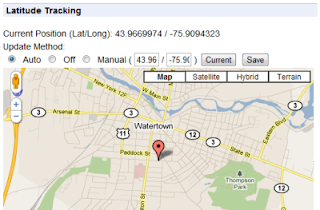
1. Shows your current location on a map.
2. Updates your latitude account with your location periodically.
3. option to set how long ( in minutes ) between updates. default 5
4. option to set how long ( in minutes ) it checks back if an error occurs. default 1
5. option to turn it off, or update with a custom position in coordinates. default auto
Currently it updates your Latitude account every 5 minutes, as well as shows you a nice little popup with your position in coordinates and on a google map.
Screenshot:
Credits:
I have to thank the "Google Latitude Updater" project from google code which doesn't seem to have made it to production, but had some crucial code to help me over a rough spot.
Also the "Geo Location" chrome extension which can be found on the chrome extensions site. The popup and geo locating code showing your position on the map actually came from there; I intend to add to it in future versions, but for now not much has been changed.
Geo Location Extension developed by thomasamsler.org
Subscribe to:
Posts (Atom)